TL;DR
Inflowave has a built-in visual sales pipeline that automatically captures leads from Instagram DMs, comments, and landing pages - and lets you move them through stages without switching tools. If you're currently using GoHighLevel pipelines, HubSpot deals, or Kommo's CRM for Instagram leads, this guide shows how Inflowave handles it natively.
Watch: Inflowave Pipeline Management
What Is an Instagram Sales Pipeline?
A sales pipeline is a visual board that shows where every lead is in your sales process - from first contact to closed deal. For Instagram businesses, this typically looks like:
- New Inquiry - someone DMs you, comments on a post, or submits a form
- Qualified - you've confirmed they're a fit
- Proposal Sent - you've shared pricing or an offer
- Follow-Up - waiting on a response
- Closed Won / Lost - deal concluded
The problem most Instagram businesses face: leads come in through DMs, but there's no system to track where each person is. Conversations get buried. Follow-ups get forgotten. Deals fall through the cracks.
GoHighLevel has a pipeline feature - but it's built for email and SMS funnels, not Instagram-first businesses. HubSpot has deals - but it costs $100+/month and requires a Zapier integration to connect Instagram DMs. Kommo has a pipeline - but it also requires third-party connectors for Instagram.
Inflowave's pipeline is native to Instagram. Every DM, comment trigger, and landing page form feeds it automatically.
How to Set Up Your Instagram Pipeline in Inflowave
Step 1: Open the Pipeline Module
- Log in to your Inflowave account
- Click Pipeline in the left navigation
- You'll see your default pipeline board - a Kanban-style layout with drag-and-drop stages
If this is your first time, Inflowave creates a default pipeline with starter stages. You can rename, reorder, or delete any stage.
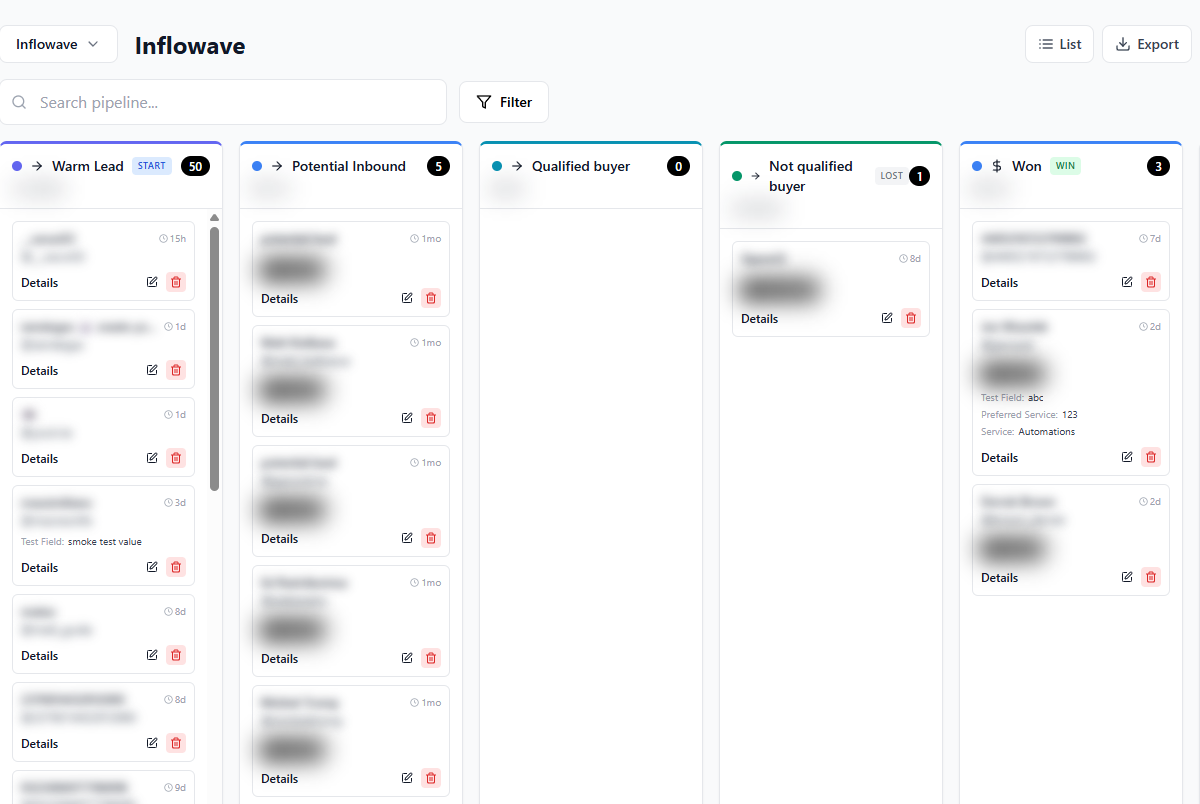
The Inflowave pipeline board shows leads grouped by stage - drag cards across columns to move deals forward.
Step 2: Create Your Pipeline Stages
Click Manage Stages to customize your pipeline for your business:
For coaches and consultants:
- New Lead → Discovery Call Booked → Proposal Sent → Follow-Up → Closed
For agencies:
- New Inquiry → Qualification → Scope Sent → Contract Sent → Active Client
For e-commerce:
- Abandoned DM → Interest Confirmed → Purchase Link Sent → Purchased → Upsell
You can create multiple pipelines for different offers, campaigns, or client types.
Step 3: Connect Your Lead Sources
This is where Inflowave's integration becomes its biggest advantage. You can feed leads into the pipeline automatically from:
Instagram DMs: Any DM containing a keyword (e.g., "pricing", "interested", "how much") can trigger a workflow that creates a pipeline card automatically.
Comment Triggers: When someone comments on a post with your trigger word (e.g., "GUIDE"), the auto-DM reply is sent AND a pipeline card is created.
Landing Page Forms: When a visitor submits your Inflowave landing page, they're added to the pipeline stage you specify - no Zapier needed.
Manual Entry: You can create pipeline cards manually for any lead you're working with.
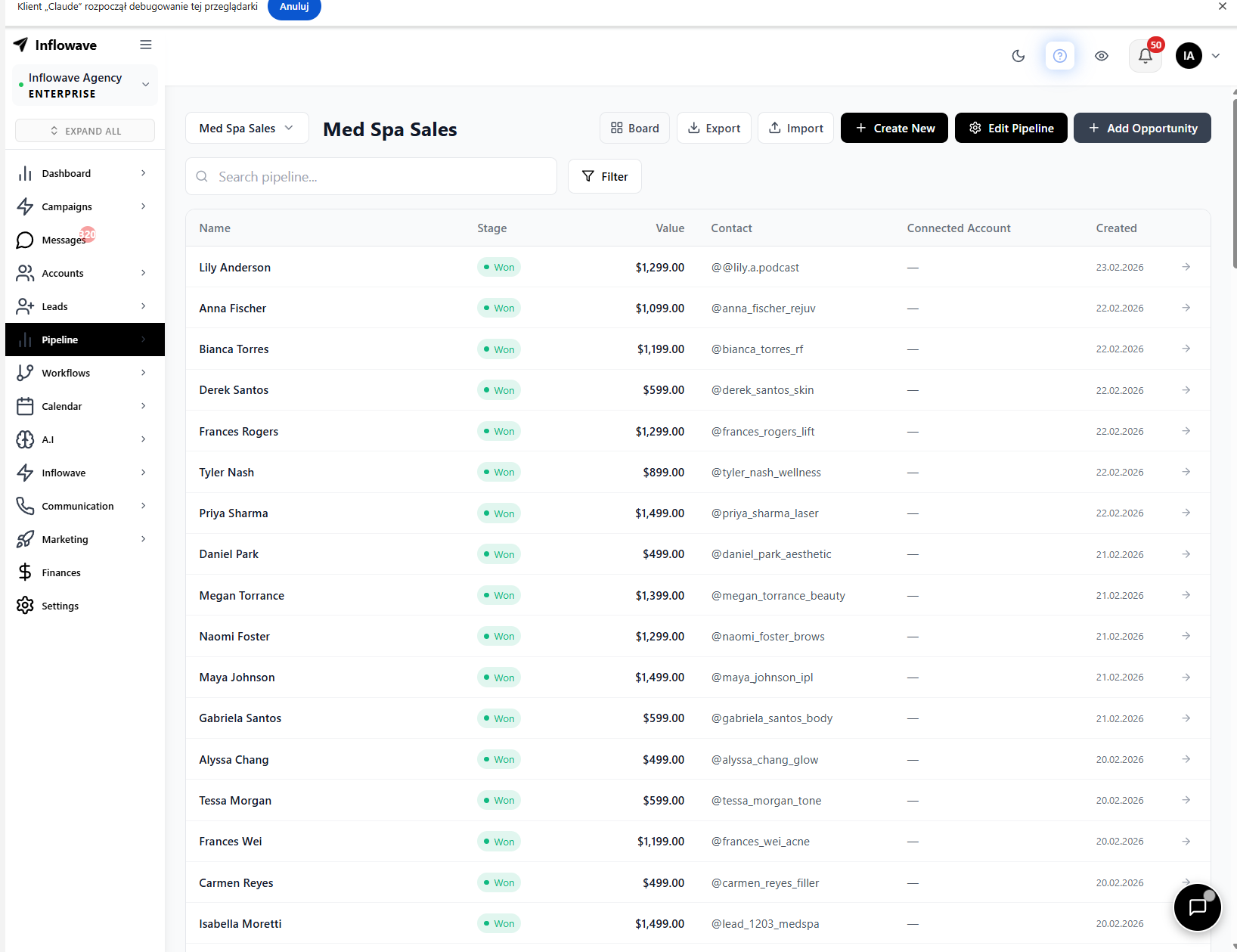
The list view gives you a spreadsheet-style overview of all pipeline leads - sortable by stage, source, assigned member, and last contact date.
Step 4: Automate Stage Transitions
Inflowave lets you trigger actions when a lead enters or exits a pipeline stage:
- Enter "Proposal Sent" → automatically send a DM with your pricing document link
- Enter "Follow-Up" → wait 48 hours, then send a follow-up DM automatically
- Enter "Closed Won" → tag the contact, send a welcome message, assign to an onboarding workflow
Go to Workflows → create a new workflow → set the trigger to Pipeline Stage Change → add your actions.
Step 5: Track and Filter Your Pipeline
Inside the pipeline board:
- Card view shows lead name, source, assigned team member, stage duration, and last contact date
- Filter by source, tag, assigned member, or date range
- Search across all pipeline cards by contact name or keyword
- Pipeline value shows total estimated deal value across stages
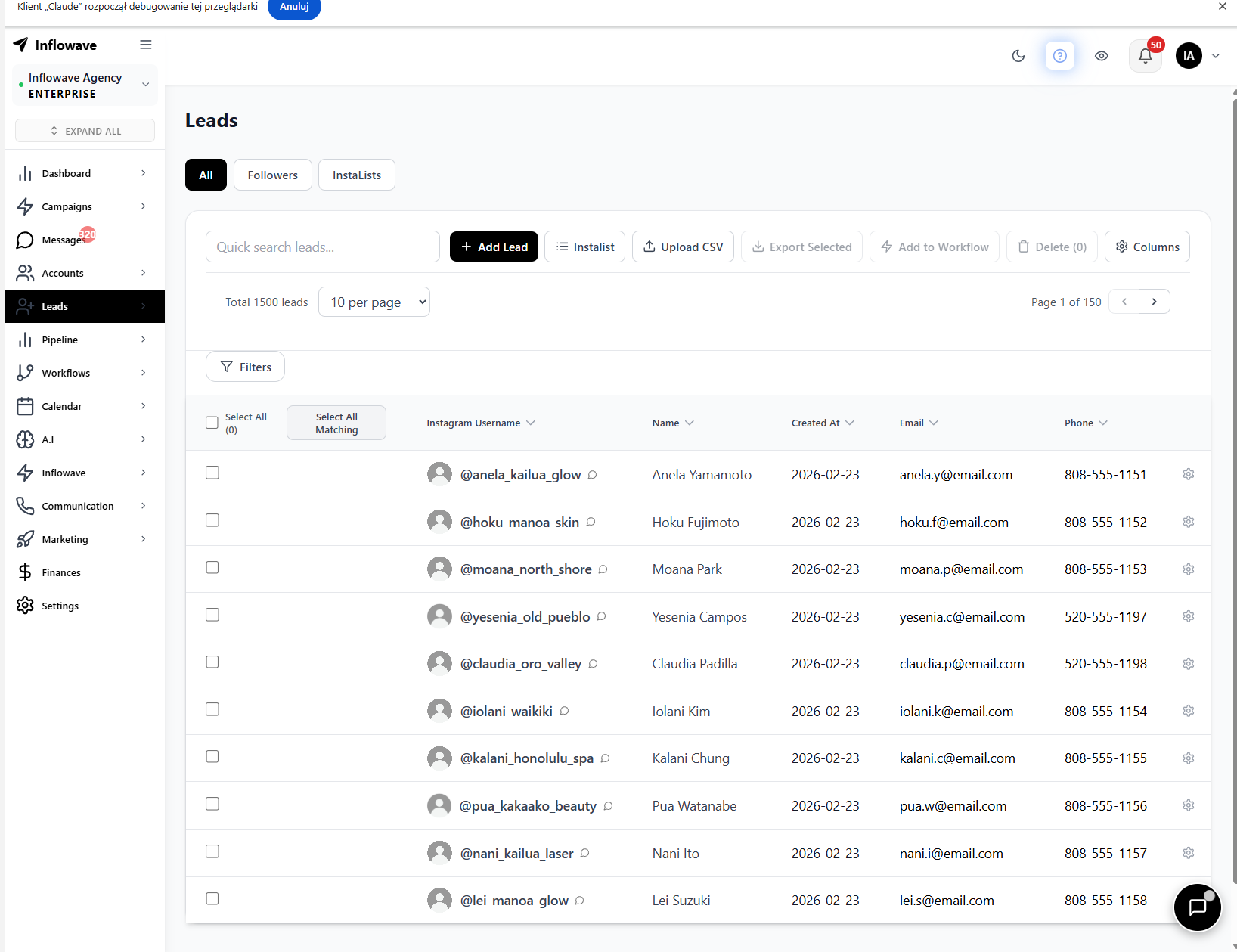
The Leads section gives you a full contact database - every lead captured from DMs, comment triggers, and landing pages in one searchable list.
Inflowave Pipeline vs. GoHighLevel, HubSpot, and Kommo
| Feature | Inflowave | GoHighLevel | HubSpot | Kommo |
|---|---|---|---|---|
| Native Instagram DM integration | ✅ | ❌ Partial | ❌ Needs Zapier | ❌ Needs connector |
| Auto-create cards from DMs | ✅ | ❌ | ❌ | ❌ |
| Comment trigger → pipeline | ✅ | ❌ | ❌ | ❌ |
| Landing page → pipeline (native) | ✅ | ✅ (GHL only) | ❌ | ✅ (Kommo forms) |
| Stage automation / workflows | ✅ | ✅ | ✅ | ✅ |
| Instagram DM from pipeline card | ✅ | ❌ | ❌ | ❌ |
| Multi-pipeline support | ✅ | ✅ | ✅ | ✅ |
| Included in base plan | ✅ | ❌ Extra | ❌ Paid tier | ❌ Paid tier |
GoHighLevel pipelines are powerful for multi-channel agencies but require a Meta integration and sub-account setup for each client. HubSpot deals are best for B2B SaaS - connecting Instagram requires a third-party marketplace app. Kommo has a solid Instagram connector, but it's still not native - pricing starts at $15/user/month.
Inflowave was built from the ground up for Instagram. The pipeline isn't bolted on - it's the core of how leads flow through the product.
Practical Pipeline Workflows
The "Price Inquiry" Pipeline
Trigger: Someone DMs "how much" or "pricing"
- Send automated reply with pricing PDF link
- Create pipeline card in "Proposal Sent" stage
- Tag contact: "price-inquiry"
- Wait 24 hours → send follow-up DM
- If no response after 72 hours → move to "Follow-Up" stage
The "Comment Lead" Pipeline
Trigger: Someone comments on your reel with "FREE"
- Auto-DM with free resource link
- Create pipeline card in "New Lead"
- Wait 1 hour → send second DM with value-add
- If they reply → move to "Qualified"
The "Form Submission" Pipeline
Trigger: Landing page form submitted
- Create pipeline card in "New Inquiry"
- Send instant DM: "Thanks for reaching out..."
- Assign to sales team member (round robin)
- Notify team member via email
Frequently Asked Questions
How is Inflowave pipeline different from GoHighLevel?
GoHighLevel workflows are optimized for email and SMS automation - Instagram DMs are a secondary channel that requires additional setup. Inflowave's pipeline is built around Instagram from the ground up.
Can I use Inflowave as a HubSpot alternative for Instagram?
Yes. If your sales process is primarily Instagram-based, Inflowave covers everything HubSpot would do for those leads - contact records, pipeline stages, follow-up automation, and deal tracking - at a fraction of the cost.
Does Kommo work better than Inflowave for Instagram CRM?
Kommo has a strong Instagram connector, but it requires a third-party integration. Inflowave's pipeline reads DMs, comments, and story interactions natively - no connector required.
How many pipelines can I create?
Inflowave supports multiple pipelines - create separate ones for different offers, teams, or client campaigns.
Conclusion
An Instagram sales pipeline is the difference between a consistent close rate and a chaotic DM inbox. Inflowave gives you a pipeline that builds itself: leads flow in automatically from every Instagram touchpoint, stages update via workflows, and follow-ups send on autopilot.
Related Tutorials
- Instagram Comment Automation: How to Set Up Comment Triggers
- How to Set Up an Instagram AI Chatbot with Inflowave
- Instagram Workflow Automation: Build Multi-Step Automations
- Instagram Broadcast Messages: Send DM Campaigns at Scale
Explore More
- Feature: AI CRM - Manage Instagram leads and deals in one place
- Feature: AI Chatbot - Automate DM conversations with AI
- Feature: Analytics Dashboard - Track performance across all your accounts
- Free Tools - Free Instagram marketing calculators and tools
- Pricing - Plans for creators, businesses, and agencies