SMS and email that clear compliance and arrive
A2P 10DLC registration inside the product with the rejection reasons shown back to you, the number you already own kept as it is, your domain authenticated record by record, and sending rotated across mailboxes.
Then it lands in the same inbox as the DMs, against the same person.
Get StartedA2P 10DLC registration, done where you can see it
The first thing anyone learns about business texting in the United States is that you cannot just start. Carriers require every business sending automated messages over an ordinary ten-digit number to register a brand, meaning who you are, and a campaign, meaning what you intend to send and how people agreed to receive it. Skip it and your messages do not bounce, which would at least be honest. They report as sent and quietly never arrive.
Most platforms hand you a link to a carrier console at this point. This one keeps it inside the product, which matters less for the filling in and much more for what happens when it comes back rejected.
If you want the underlying rules rather than our implementation of them, we wrote up the six checks reviewers actually run, and the privacy-policy sentence most rejections come down to. It is useful whichever platform you end up on.
It tells you why it failed
A rejected registration with no stated reason is the most miserable part of getting business texting working, and it is where people give up. You get the brand score, the specific error items and the feedback that came back, so you are fixing the named problem rather than changing something at random and waiting another few days. If the score itself is the issue, you can request secondary vetting, a manual review that regularly clears legitimate businesses the automated scoring underrates for being small or new.
It scans your site first, before you pay the vetting fee
The part that saves people the most money. Before you submit anything, and crucially before the vetting fee is charged, we run the same whole-site review the carriers run and give you a score out of a hundred with a verdict: very likely to pass, likely to pass, some fixes recommended, or not ready yet. Submitting blind and paying to be rejected is the normal experience of A2P registration, and it does not need to be.
It opens your website and checks it loads over HTTPS and returns a real page. It looks at whether you have an actual multi-page site or something that reads as a single landing page, which carriers treat differently. It reads your privacy policy for the mobile data clause and the STOP wording they require. It looks through your lead forms for a phone field and an SMS consent checkbox. It reviews your sample messages for STOP, HELP and a clearly identified business name. It checks the phone, email and address on your site actually match what you have registered, which catches the mismatch that quietly fails more registrations than anything else. And it looks for chatbots collecting phone numbers without consent.
Then it gives you a fix list split into two piles: the things you can do yourself, and the things to send to whoever built your website, with the wording already written so you are forwarding an instruction rather than trying to explain carrier compliance to a developer who has never heard of it.
You see the fee before you commit to it
Registration costs money, set by the carriers and the registry rather than by us, and it changes. The product itemises the current cost before you submit and records what was charged afterwards. We are deliberately not printing a figure on this page, because a number here would be wrong within a few months and it is exactly the kind of number people hold you to.
Registered per client, not per agency
If you run texting for other businesses, each one registers as itself, with its own brand, its own authorised representative and its own campaigns, scoped to its own workspace. That is not a nicety. The registration is a statement about who is actually sending, and putting twenty clients under your own brand is both wrong and fragile.
Or we do it with you
The scan tells you what is wrong. Some of it, like adding a consent checkbox to a form or getting the right clause into a privacy policy on a site you did not build, is genuinely annoying to fix on your own. So registration is part of what our team sets up for you, alongside the numbers, the domain authentication and the workflows that end up sending.
This is the single most common place a business gives up on SMS entirely, usually after a second rejection with no explanation. It is worth not doing alone the first time.
Have us set it upIn fairness: GoHighLevel handles A2P registration inside their product too, and their written guide to it is better than ours. Where we would claim a difference is the pre-submission scan, because being told what will fail before you pay is a different experience from being told after.
What is actually included
- A2P 10DLC brand and campaign registration, with scores, named errors and resubmission
- A pre-submission scan of your whole site, scored, BEFORE the vetting fee is charged
- A fix list split into what you can do and what to send your web developer
- Secondary vetting when an automated score comes back too low
- Buy a number, or keep the one you already have through hosted messaging
- Regulatory bundles for countries that need their own paperwork
- Phone number reputation checked before you send from it
- Your own email domain with DKIM, SPF and DMARC verifying independently
- Sending pools: rotation across mailboxes, per-mailbox daily caps, sticky per lead
- Numbers, mailboxes and pools all scoped per client and workspace
- Broadcasts to a filtered audience, with sent, failed and total reported back
- Every text and email in the same inbox as the DMs, on the same contact
- Workflows that send both, including from a pool rather than one address
Not included, and worth knowing now: there is no drag-and-drop newsletter designer with a template gallery, and our cost per message is higher than a dedicated sending platform. Both are covered further down rather than left for you to discover.
The number you send from
Buy one
Search by area code and buy a number inside the product. Most businesses starting out want a local number for the area they serve, because a recognisable area code gets answered and replied to more than an unfamiliar one.
Or keep the one you have
Hosted messaging adds texting to a number you already own without moving it. Voice stays where it is, so the phone in the shop keeps ringing. We check eligibility first and tell you the type, local, toll-free or mobile, then verify by an automated call or a copy of the phone bill.
Outside the US
A2P 10DLC is a US scheme. Elsewhere the requirement is usually a regulatory bundle: identity and address documents, sometimes proof of local presence. The product tells you what a given country wants, takes the uploads and submits it.
Check it before you use it
Numbers carry reputation, and a recycled one can arrive already carrying somebody else problem. You can check a number reputation rather than discovering it from a delivery rate three weeks in.
Email that reaches an inbox rather than a spam folder
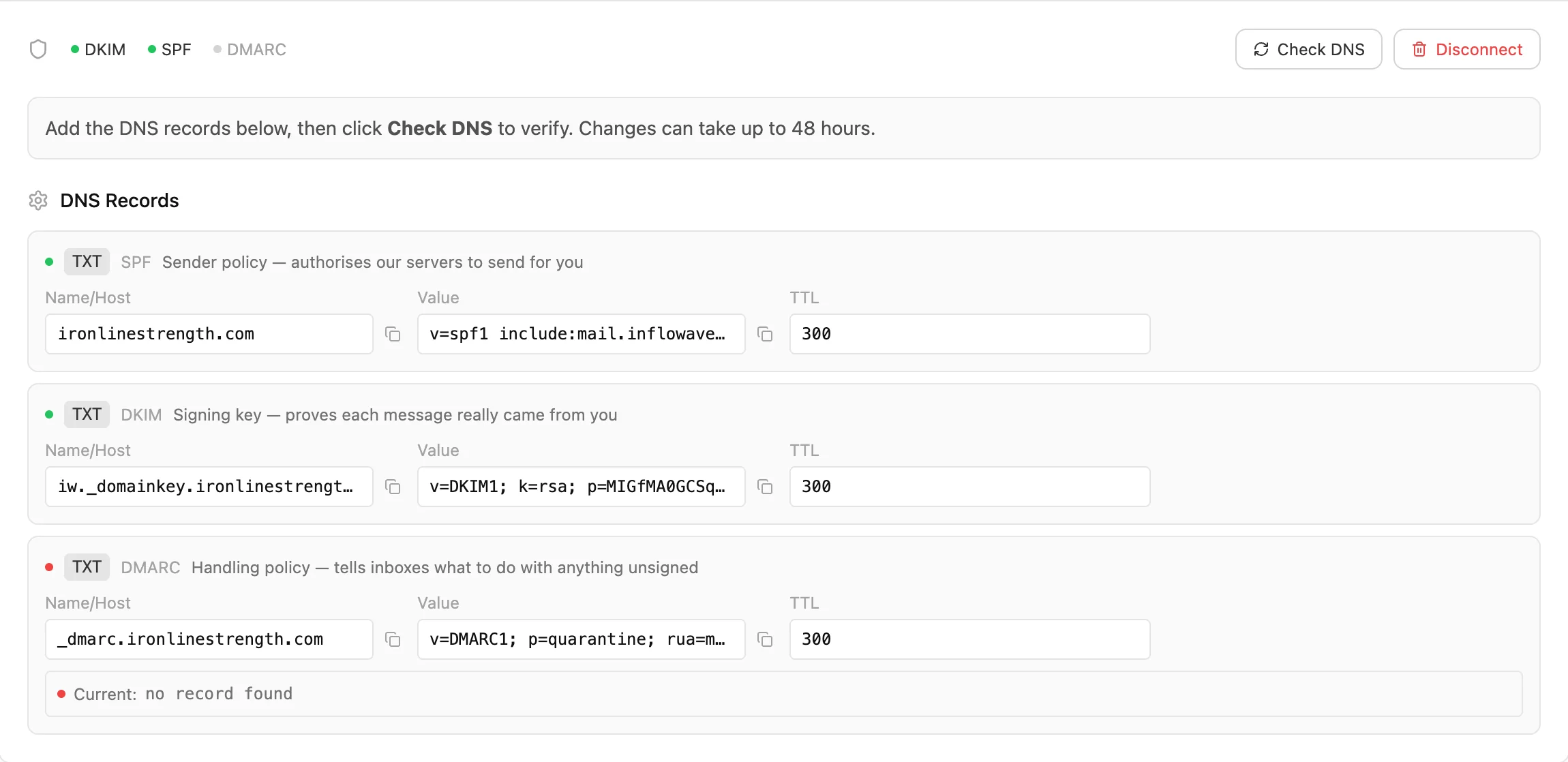
Three records, verified one at a time
DKIM signs your mail so a receiving server can prove it really came from you. SPF lists which servers are allowed to send as your domain. DMARC tells the receiver what to do when one of those fails, and both Google and Microsoft now expect it from anyone sending in volume. We generate the records, you paste them at your registrar, and each verifies on its own, along with the return path and domain verification. When something is wrong you can see which single record it is, which is the difference between a ten-minute fix and a support ticket.
Sending pools, and why one mailbox is not enough
If you are doing outbound at any scale, sending everything from one address is what gets that address filtered. A sending pool is a named group of your verified mailboxes that a workflow sends through instead. At send time it picks the least recently used one, respects the daily cap you set on each, and keeps the same lead on the same mailbox every time, so a conversation never arrives from three different addresses and a reply always comes back to the mailbox that started it.
The pool shows how many mailboxes are in it, how many are verified and therefore actually usable, and the total daily capacity that adds up to, plus a warning when a member has no cap set at all. This is cold-outreach infrastructure, and it is the part of email that broadcast platforms do not do, because sending one newsletter to everybody from one identity is a different problem.
Broadcasts, and an honest limit
You can write a one-off email, filter down who gets it and send, then see how many went, how many failed and how big the audience was. What this is not is a newsletter designer: there is no drag-and-drop layout builder and no gallery of templates. If your email programme is a designed monthly newsletter, that is a job for a dedicated platform and we are not going to pretend otherwise.
What it costs, including where we lose
Sending here runs on credits that come with your plan. An email is one credit and a text is four, and Instagram follow-ups inside an existing conversation are free.
Compared per message, that is more expensive than the alternatives, and it is not close on email: roughly thirty times what GoHighLevel charges per email, and forty times HubSpot. We would rather write that down than have you work it out later.
The reason the comparison is not that simple is that those per-message rates sit on top of a monthly base fee, and ours do not. GoHighLevel is a few hundred a month before you send anything, and HubSpot Marketing Professional is several thousand. Our credits are buying the whole platform, so which arrangement is cheaper depends entirely on your volume and your mix. At high newsletter volume a dedicated email platform wins outright.
So rather than telling you we are cheaper, here is the calculator we use ourselves. Put in the emails, texts and AI messages you actually send in a month and it works out what that costs here against GoHighLevel, ManyChat and HubSpot on their published rates.
High volume gets rate overrides per agency or per account, so if the calculator makes this look wrong for you talk to us about enterprise pricing before ruling it out.
The same person, not three separate tools
A text about an appointment and an Instagram DM from a fortnight ago are the same customer having one continuous relationship with you. In most stacks they sit in two products that have never heard of each other, so whoever picks up the reply is answering blind.
Here both land in the same inbox against the same contact, on the same deal, with the emails, texts, DMs, page views, bookings and payments on one timeline. That is the actual argument for having SMS and email in this product rather than buying the cheapest sender you can find: not the price per message, the fact that the message has context.
Against GoHighLevel, ManyChat and HubSpot
The same three the calculator prices you against, so the two cannot contradict each other. Mailchimp and Klaviyo are dealt with underneath: they are a different category, and beating them on a capability table would be a trick rather than an answer.
| Capability | Inflowave | GoHighLevel | ManyChat | HubSpot |
|---|---|---|---|---|
| Send SMS and email from one place | Yes | Yes | Yes | Partly |
| A2P 10DLC registration handled inside the product | Yes | Yes | Unclear | Unclear |
| Brand score and rejection reasons shown back to you | Yes | Partly | Unclear | Unclear |
| Bring a phone number you already own | Yes | Partly | No | Unclear |
| Register for SMS outside the US | Yes | Partly | Unclear | Unclear |
| Your own domain authenticated with DKIM, SPF and DMARC | Yes | Yes | Partly | Yes |
| Rotate sending across a pool of mailboxes, sticky per lead | Yes | No | No | No |
| Per-mailbox daily caps enforced at send time | Yes | No | No | No |
| Texts and emails land in the same inbox as the DMs | Yes | Yes | Yes | Partly |
| Included in the plan rather than billed on top of a base fee | Yes | No | No | No |
- Send SMS and email from one place: Table stakes, and nobody should choose on this row. HubSpot is partial only because SMS needs Marketing Hub Professional plus a paid add-on rather than being included.
- A2P 10DLC registration handled inside the product: GoHighLevel does this too and documents it well; their guide ranks page one for the term. Not our idea and not ours alone. We are claiming parity here, not advantage.
- Brand score and rejection reasons shown back to you: The failure mode this addresses is a rejected campaign with no stated reason. We surface the brand score, the specific error items and a resubmit path, plus secondary vetting when the score comes back too low.
- Bring a phone number you already own: Hosted SMS: keep your existing business number, including one that still takes voice calls elsewhere, and send texts from it. Eligibility check, then a verification flow.
- Register for SMS outside the US: Regulatory bundles for countries that require them, with the document upload and submission handled in the product rather than in a Twilio console you were never given access to.
- Your own domain authenticated with DKIM, SPF and DMARC: Standard and correctly so. We show each record verifying independently rather than one combined pass or fail, which is the difference between fixing it in ten minutes and opening a support ticket.
- Rotate sending across a pool of mailboxes, sticky per lead: This is cold-outreach infrastructure rather than broadcast email. A pool of verified mailboxes, least-recently-used rotation, a daily cap per mailbox, and the same lead always kept on the same mailbox so a thread never arrives from three different addresses. Mailchimp and Klaviyo do not do this either, by design.
- Texts and emails land in the same inbox as the DMs: HubSpot has a conversations inbox, but Instagram is a third-party connector, so the thread is not natively beside the email.
- Included in the plan rather than billed on top of a base fee: The one row where the framing matters more than the tick. Their per-message rates are far lower than ours; those rates sit on top of a monthly base of $297, $75 and $3,600 respectively. Which arrangement is cheaper depends entirely on your volume, so put your own numbers into the calculator rather than believing either of us.
Where the others are stronger. On raw price per message we lose, and not narrowly: an email here costs roughly thirty times a GoHighLevel email and forty times a HubSpot one on marginal cost. If you are sending a hundred thousand newsletters a month, a dedicated email platform like Mailchimp or Klaviyo will be dramatically cheaper than us and better at the job, because segmenting and designing a mass broadcast is their entire product and it is a side of email we are not trying to win. GoHighLevel matches us on A2P registration and documents it better than we do. HubSpot has reporting we cannot approach. And ManyChat at $75 a month is simply a cheaper starting point than we are.
What you are buying here is not cheap sending. It is that the text, the email and the Instagram DM are the same conversation with the same person, sitting on the same deal, triggered by the same workflows, with the compliance paperwork that makes SMS legal handled in the product rather than in a Twilio console. Add the sending pools, which are cold-outreach infrastructure that broadcast email tools do not have, and the case is: fewer subscriptions, one contact record, and a message history that does not stop at the channel boundary. If what you need is to send a beautiful newsletter to eighty thousand people, buy the newsletter tool.
Competitor capabilities from vendor documentation, and prices from their published pricing, checked 30 July 2026. Where we could not confirm from vendor documentation the cell says Unclear rather than No. Verify any row that decides your choice, and price it yourself in the calculator.
Tool by tool
The verdict per tool, each starting with the case for buying theirs. On price per message that case is genuinely strong every time.
Inflowave vs GoHighLevel
Buy theirs when: Closest product in the table and cheaper per message by a long way, at roughly a cent an SMS against our eight. They handle A2P registration too, and their documentation on it is better than ours. If your volume is high and you are already paying their base fee, the sums favour them.
Buy ours when: Two things they do not do: rotate sending across a pool of mailboxes with per-lead stickiness and daily caps, which is what cold outreach actually needs, and Instagram depth. If your messaging starts in DMs rather than in a form fill, that is the gap.
Inflowave vs ManyChat
Buy theirs when: A cheaper starting point at $75 a month, and for pure Instagram comment-to-DM automation it is the category default with the biggest template library. Their SMS is about a cent a message against our eight.
Buy ours when: Their lower tiers cap you at any three channels, so the price you compared is rarely the price you end up paying once email and SMS are added. There is no domain-level email infrastructure of the kind you need to send from your own mailboxes at any scale, and no A2P registration flow we could confirm.
Inflowave vs HubSpot
Buy theirs when: Reporting, segmentation and an ecosystem we cannot match, and their per-email cost is the lowest of anyone here. For a company already running on HubSpot, staying is nearly always the right answer.
Buy ours when: The base is $3,600 a month for Marketing Professional, SMS is a paid add-on on top of that, and their SMS is the most expensive per message in the table at seven and a half cents. Instagram is a third-party connector. It is a different budget and a different shape of company.
Who this is built for
Agencies sending on behalf of clients
Each client registers as itself, with its own brand, its own number and its own mailboxes, scoped to its own workspace. That keeps the compliance story truthful, and it means one client sending hard cannot damage another client deliverability. Doing this properly is also something you can charge for, because most small businesses will never get through A2P registration on their own.
More in the agency use case and agency pricing.
Sales teams doing outbound
The sending pools exist for this: multiple mailboxes, daily caps, rotation, and the same lead always on the same address so a thread reads like a person wrote it. Combined with texts that arrive because the registration is done, and replies landing in the same inbox as everything else rather than in a shared mailbox nobody owns.
Small and medium businesses that just need the texts to arrive
If you are a clinic, a salon, a studio or a trade, you almost certainly do not want a marketing platform. You want appointment reminders that arrive, from a number customers recognise. Host the number you already advertise, get through registration once, and let the workflows send the confirmation and the reminder. The no-show rate is the number that moves, and for an SMB it moves more than anything else on this site.
See how small businesses use Inflowave and what it costs for a small team.
Who should not buy this for email
If your email is a designed newsletter going to a large list every month, and what you care about is the template editor, the segmentation and the price per thousand sends, buy a dedicated email platform. You will pay less and get a better tool for that job. We are built for messages attached to a conversation and a deal, not for broadcast publishing.
Setting it up
1. Start the registration before you need it
Vetting is the slow part and it is outside our control. Get the business profile and the authorised representative in first, with the legal name exactly as registered, and make sure your website, privacy policy and terms pages are live before you submit rather than after you are rejected.
2. Decide about the number early
If customers already have a number for you, check whether it can be hosted, because a new number means teaching everyone a new number. If it cannot be, buy one in the right area code and start using it somewhere visible so it becomes familiar.
3. Authenticate the email domain properly
All three records, not two. DNS changes take a while to propagate, so add them and come back rather than watching the screen. Then send a test to yourself at a Gmail address and a Microsoft one, because that is where most of your recipients are and they are the strictest.
4. Build a pool only if you are doing outbound
For emailing existing customers, one verified domain is fine and a pool is over-engineering. For cold outreach, add several mailboxes, set a daily cap on every one of them, and check the pool is not reporting an uncapped member, because an uncapped mailbox in a rotation is the one that gets burned.
5. Price it before you commit
Put your real monthly volumes into the calculator. If they make this look expensive against a dedicated sender, they probably do, and it is better to know now than three invoices in.
Common questions
What is A2P 10DLC registration?
A2P means application-to-person: a business sending texts through software rather than a human typing on a phone. 10DLC is the ten-digit long code, an ordinary local number. US carriers now require that any business sending A2P traffic over a 10DLC number registers two things, a brand, meaning who you are as a company, and a campaign, meaning what you intend to send and how people opted in. Unregistered traffic gets filtered or blocked, which is why messages can report as sent and never arrive. It is not optional and there is no way around it.
How do I register for 10DLC?
You need your legal business name exactly as registered, your business registration or tax number, a real business address, an authorised representative with a working email and phone, a live website, and privacy policy and terms pages that are actually reachable. Then you register the brand, wait for a score, and register a campaign describing your use case with sample messages and how people consent. Here that is a form in the product rather than a carrier console, and it checks your URLs are live before submitting, because a dead privacy-policy link is one of the most common causes of rejection.
How long does A2P 10DLC registration take, and what does it cost?
Both are set by the carriers and The Campaign Registry rather than by us, and both change, so we will not quote a number that goes stale. Brand registration is usually the quick half and campaign vetting the slow one. The product itemises the current fee before you submit anything and records what was charged afterwards. Plan for it not being instant: register before you need to send, not the week you are launching.
My A2P campaign was rejected. What now?
The usual causes are a business name that does not match the registration exactly, an unreachable privacy policy or terms page, sample messages that do not match the stated use case, or a consent description that does not explain how people actually opted in. We show the brand score, the specific error items and the feedback rather than a bare failure, so you fix the named thing and resubmit. If the score itself was the problem, secondary vetting can be requested, which is a manual review that regularly clears businesses the automated scoring underrates for being small or new. The six checks, and how to fix each one.
How do I know if my A2P registration will be approved before I pay?
Run the pre-submission scan. It reviews your site the way the carriers do, before the vetting fee is charged, and returns a score out of a hundred with a verdict from very likely to pass down to not ready yet. It checks HTTPS and whether the site is more than one page, reads your privacy policy for the mobile data clause and STOP wording, looks through your lead forms for a phone field and a consent checkbox, reviews your sample messages for STOP, HELP and a clear business name, and confirms the phone, email and address on your site match your registration. Then it lists the fixes, split into what you can do yourself and what to forward to your web developer with the wording written for you.
Can someone just do the A2P registration for me?
Yes. Registration is part of what our team sets up in a done-for-you buildout, along with the numbers, the domain authentication and the workflows that end up doing the sending. It is worth considering for the first one specifically, because A2P is where most businesses abandon SMS altogether, usually after a second rejection they cannot interpret. Once a brand is registered and approved, adding campaigns later is much easier and you will not need help with it again. How the done-for-you buildouts work.
Can I keep the number my customers already have?
Usually yes, through hosted messaging. We check whether the number is eligible first and tell you what type it is, local, toll-free or mobile, then verify, either by an automated call to that number or a copy of your phone bill. The point of hosting rather than porting is that voice stays exactly where it is: the phone in the shop keeps ringing, and the same number gains the ability to text. Porting a number away from the system that answers your calls is a much bigger decision, and this avoids it.
Can I send SMS outside the United States?
Yes, and several countries have their own paperwork instead, since A2P 10DLC is a US scheme. Those need a regulatory bundle, meaning identity and address documents for the business and sometimes proof of a local presence. The product tells you what a given country requires, takes the document uploads and submits the bundle, so you are not doing it in a carrier portal somebody else owns the login to.
What do I have to do to make email actually arrive?
Authenticate your own domain. DKIM signs your mail so it can be verified, SPF says which servers are allowed to send as you, and DMARC tells receiving servers what to do when something fails. We generate the DNS records, you add them at your registrar, and each one verifies independently so you can see which single record is wrong. That last part sounds minor and is the difference between fixing it yourself in ten minutes and raising a support ticket about a combined failure message.
What is a sending pool and do I need one?
A named group of your verified mailboxes that a workflow sends through instead of using one address. At send time it rotates to the least recently used mailbox, respects a daily cap you set per mailbox, and keeps the same lead on the same mailbox every time, so a conversation never arrives from three different addresses. You need it if you are doing outbound at volume, where sending everything from one mailbox is what gets that mailbox filtered. You do not need it to email your existing customers.
Is this cheaper than Mailchimp or GoHighLevel?
Per message, no, and not by a small margin: an email here costs roughly thirty times a GoHighLevel email on marginal cost. What is different is that their rate sits on top of a monthly base fee and ours does not, so which is cheaper depends entirely on how much you send. At high newsletter volume a dedicated email platform will beat us outright, and we would rather you found that out from the calculator than from an invoice. Put your own volumes in the calculator.
Are Instagram DMs charged the same way?
No. Follow-up messages inside existing conversations and drip sequences on Instagram cost nothing. That is deliberate: DMs are where most of our customers actually talk to people, and metering them would change how the product gets used. SMS and email carry a credit cost because they carry a real carrier or sending cost to us. See plans and credits.
Can each client have their own number and their own mailboxes?
Yes, and for an agency that is the normal setup. Numbers, mailboxes and sending pools are scoped to a client and a workspace, so a text goes out from that client business rather than from yours, and one client sending hard cannot damage another deliverability. Brands and campaigns register per client too, because A2P registration is a statement about the business actually sending. What we build for agencies.
Do texts and emails show up with the rest of the conversation?
Yes, in the same inbox as the Instagram, WhatsApp and Facebook threads, against the same contact. It is the reason to have SMS here rather than in a separate texting tool: when somebody replies to a text about an appointment, whoever picks it up can see they were talking to you on Instagram last week about something related. About the unified inbox.
Can a workflow send these, or is it all manual?
Workflows do most of the sending in practice. A booking confirmation by text, a reminder the day before, a recap email after the call, a follow-up when a deal has sat in one stage too long. The email step can point at a sending pool rather than a single address, and everything it sends lands on the contact timeline beside the DMs and the page views. How workflows are built.
Can I send a one-off broadcast to a segment?
Yes. Write it, filter the audience down, send, and get back the number sent, the number failed and the total audience. What it is not is a drag-and-drop newsletter designer with a template gallery. If your email programme is a designed monthly newsletter, a dedicated platform does that better than we do.
Get the paperwork done and the messages delivered
Register once, keep the number your customers already know, authenticate your domain properly, and have every text and email land beside the rest of the conversation.